Up next in 10


DJI Mini 5 Pro Video Settings - White Balance Window
Show More Show Less View Video Transcript
0:00
In the same window, we can click on the
0:02
icon on the bottom left to access other
0:04
video settings. At the top, we select
0:07
the white balance value expressed in
0:09
Kelvin. Auto white balance should be
0:12
avoided as it leads to unwanted color
0:14
shift when the luminosity changes.
0:17
A quick way to find the correct value is
0:19
to tap the auto button on the left to
0:22
get the app's suggested value. Then tap
0:24
it again to switch back to manual mode
0:27
and adjust it to your test if needed.
0:30
Below the resolution frame rate areas,
0:33
we can select one of the three color
0:34
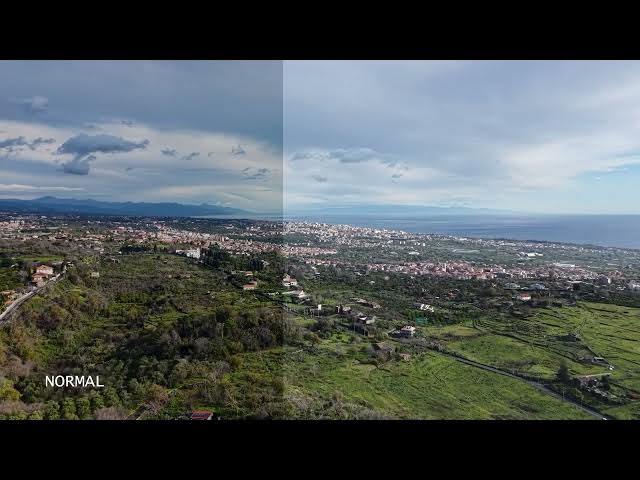
profiles, normal, HLG or DLOG M.
0:40
Normal mode is the most widely used. It
0:43
is a pre-processed profile and can be
0:45
used just out of the camera, although a
0:47
touch of extra contrast and saturation
0:50
is often beneficial.
0:52
Normal has constantly improved over the
0:55
years. It is now a true 10- bit mode
0:58
capable of displaying over 1 million
1:00
colors with excellent quality in most
1:03
likely conditions. It is an excellent
1:05
choice for users who don't realize
1:07
computer proprocessing or when editing
1:10
is not an option.
1:13
The log M is a flat profile widely used
1:16
by professionals for two reasons.
1:19
It performs better in dynamic range
1:21
situations
1:23
and it responds extremely well to
1:25
postprocessing to adapt a clip to the
1:28
color scheme of a specific project.