Up next in 10


DJI Mini 5 Pro Video Settings - Exposure Window
Show More Show Less View Video Transcript
0:00
The window for exposure is at the bottom
0:02
right of the screen. The icon to the
0:05
right toggles between auto and manual,
0:08
labeled pro. The aperture is fixed, so
0:11
we have only two values to set when
0:12
exposing, ISO and shutter speed.
0:17
In auto mode, the only control on
0:19
exposure is through the overall exposure
0:22
value, EV, the first icon to the right.
0:25
I find that this model tends to
0:27
overexpose, so I prefer to lower the EV
0:30
value by about 0.3 or 0.7.
0:35
With all other drones or camera, I avoid
0:38
filming with auto exposure as the
0:40
software compensate for the difference
0:42
in luminosity with a small lag,
0:45
a clear indicator of amateur footage.
0:49
But with the Mini5 Pro, it can be worth
0:51
using it in a specific situation as we
0:54
will see later.
0:56
In manual exposure mode, we can set the
0:58
ISO value and shutter speed
1:00
independently for more control. The mm
1:03
value at the bottom cannot be modified.
1:06
It displays the luminosity resulting
1:08
from the values chosen above compared to
1:11
the optimal exposure computed by the
1:13
software.
1:15
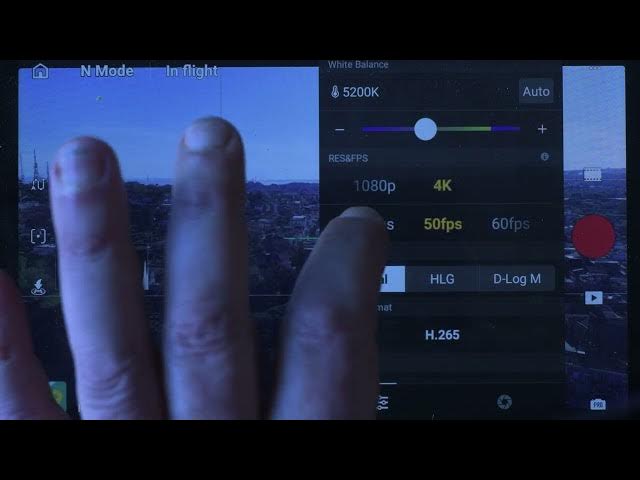
With an X icon, we can set resolution
1:18
and frame rate. There are two resolution
1:20
option, 4K and 1080p. 4K is nowadays the
1:25
standard and one I suggest using,
1:27
although 1080p can still be used for
1:30
social media if file size is an issue.
1:35
Below the resolution, there are option
1:37
for different frame rates. The most
1:39
widely used are 24 and 30. It is
1:43
recommended to use a consistent frame
1:45
rate across all clips in the same
1:47
project. Higher frame rates like 48 and
1:51
60 frame pers can be used to apply some
1:54
slow motion while editing.
1:58
In videography, the 180° rule is widely
2:02
applied. The idea is to set the shutter
2:05
speed at a value double the frame rate
2:07
to achieve the correct amount of motion
2:09
blur with a frame rate of 24 frame per
2:12
second. The ideal shutter speed is
2:14
1/50th of a second. At 30 frame per
2:18
second, 160th of a second and so on.
2:22
This rule is particularly important when
2:24
flying close to the ground or when the
2:26
scene contains moving element.
2:30
However, when flying at a high altitude,
2:33
there is more tolerance. Although very
2:35
high shutter speed values should always
2:37
be avoided.
2:40
To control the shutter speed in all
2:42
light condition, a set of ND filter is
2:44
needed. I use the free well all day
2:47
sixpack with values from ND16 to ND1000.
2:53
suitable for all light conditions, not
2:55
only for video, but also for hyperlapses
2:58
and long exposure photography.
3:00
You will find the link with prices and
3:03
info in the description of this video.
3:05
It is an affiliate link, so in case of
3:08
purchase, I receive a small commission,
3:10
which helps the channel.
3:15
As I said earlier, there is a situation
3:17
when auto exposure can be a good choice.
3:20
The specs of the Mini 5 Pro claim a
3:22
whopping 14 stops of dynamic range using
3:26
the dual ISO fusion.
3:30
This technique can only be applied when
3:32
filming in auto exposure.
3:36
Another possibility is to use manual
3:38
exposure setting the ISO value to auto.
3:42
I do find that in high dynamic range
3:44
situation it is worth using this
3:46
technique for improved results.