live_tv
Livestream Starting Soon
00
Hours
:
00
Minutes
:
00
Seconds
Up next in 10


DJI Mini 5 Pro Photography - RAW vs JPEG
Show More Show Less View Video Transcript
0:02
Images taken with Mini Pro can be saved
0:04
in RAW or JPEG format or both. The
0:08
advantage of JPEG files is that they are
0:10
smaller and pre-processed, suitable for
0:13
users who don't rely on heavy
0:15
post-processing or need to share their
0:17
photos immediately.
0:20
Until a few years ago, the difference in
0:22
quality between RAW and JPEG files was
0:24
massive. However, JPEG have improved
0:27
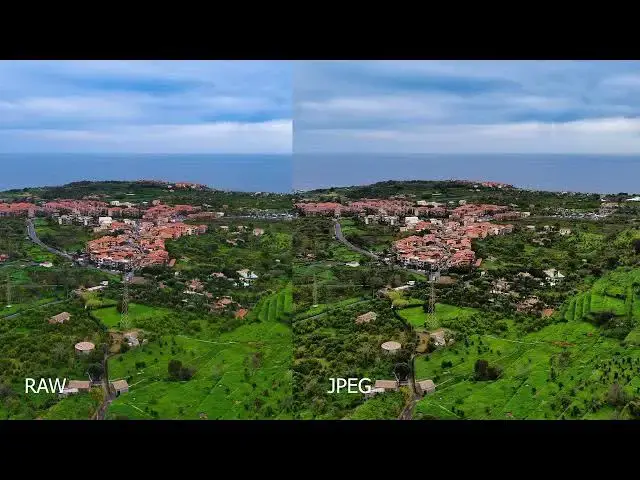
constantly since. As you can see from
0:30
these examples, the rendition of the
0:32
JPEG is almost as good as the RAW. We
0:35
just notice a touch of extra detail in
0:37
the shadows and a slightly better
0:39
rendition of the sky for the row. I
0:43
generally shoot in both format and use
0:44
the RAW files on most occasions as they
0:47
respond better to post-processing and
0:49
can be adapted to the color scheme of a
0:51
specific project.
0:54
However, the JPEG are an excellent
0:55
alternative when time saving is the
0:58
priority.
0:59
I am already very impressed by the
1:01
quality of the new sensor of the Mini 5
1:03
Pro. I shot this photo in a very cloudy
1:06
day with a flat sky and relatively low
1:08
visibility. I kept the color grading to
1:11
a minimum, just an adjustment of the
1:13
overall luminosity and a touch of extra
1:16
contrast. The amount of information in
1:18
the shadows and the structure of the sky
1:20
are outstanding.