videocam_off
This livestream is currently offline
Check back later when the stream goes live
Up next in 10


DJI Mini 5 Pro - Exposure Settings
Show More Show Less View Video Transcript
0:00
We find the exposure settings in the
0:02
lower part of the screen to the right.
0:05
In auto mode, the exposure is set by the
0:07
software and we can only access the EV
0:10
value to adjust the overall luminosity.
0:13
Since the app tends to overexpose
0:15
slightly, I prefer to set the value at
0:18
minus0.3 or minus0.7.
0:22
By tapping on the icon on the right, we
0:23
access manual mode labeled as pro. Then
0:27
tapping on the values area slightly to
0:30
the left, we access the window for
0:32
exposure.
0:34
In photography, there are three
0:36
parameters for exposure, ISO, aperture,
0:39
and shutter speed. But with the Mini 5
0:41
Pro, like most other presumemer drones,
0:44
we only have two values to deal with as
0:47
the aperture is fixed. We can set the
0:50
values for ISO and shutter speed
0:52
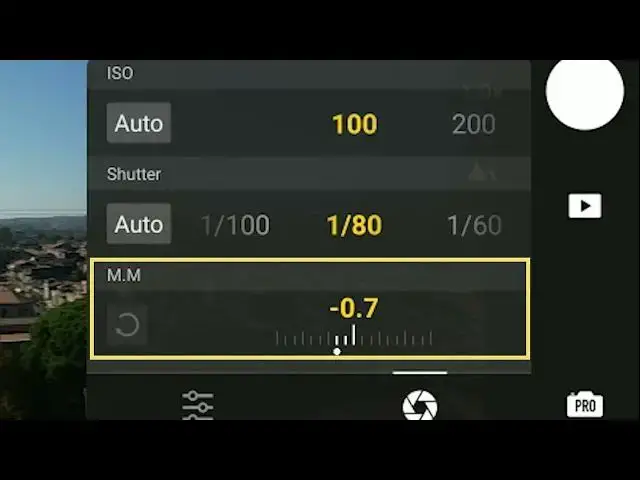
independently. The mm value at the
0:55
bottom cannot be modified. It displays
0:57
the luminosity resulting from the values
0:59
chosen above compared to the optimal
1:02
exposure computed by the software.
1:06
In this window, one of the two values
1:08
ISO or shutter speed can be set to auto.
1:12
Let's say we want a fixed value for ISO
1:14
100. To get the best possible image
1:17
quality, we set ISO to 100 and shutter
1:20
speed to auto. When the luminosity
1:23
varies, only the value for shutter speed
1:25
changes to maintain the correct
1:27
luminosity, leaving the ISO at 100.
1:31
Notice that the value mm has now turned
1:33
into EV for exposure value, and it can
1:36
be modified.
1:39
On other occasions, we might want a
1:41
constant value for shutter speed. We
1:43
select the desired value for shutter
1:44
speed and set the ISO to auto. And this
1:47
time as the luminosities increases or
1:49
decreases only the ISO varies.
1:53
By tapping on the icon on the lower
1:55
left, we access another window where we
1:57
can adjust the white balance, select the
1:59
file format and image size, and check
2:02
the storage space remaining in the SD
2:05
disk and internal memory. Sorry.